Built to make you extraordinarily productive, agents turn ideas into code. Accelerate development by handing off tasks to Cursor.

No ratings yet|8

From $0

On this page

What is Cursor?

Cursor is an AI-first code editor built by Anysphere, a San Francisco company founded in 2022 by four MIT students — Michael Truell (CEO), Sualeh Asif, Arvid Lunnemark, and Aman Sanger. Built as a fork of Visual Studio Code, Cursor has grown from a VS Code extension-style tool into a full agentic IDE: it ships its own frontier coding model (Composer), a cloud-hosted Background Agent that can pick up GitHub issues and draft pull requests on its own, a public BugBot service that reviews pull requests automatically, plus native macOS/Windows/Linux apps, a JetBrains plugin, iOS and Android apps, and a headless CLI.

Cursor's growth has been extraordinarily fast: the company reported $100 million in annualized revenue in January 2025, $500 million by June, $1 billion by November, and $2 billion by February 2026 — reportedly making it the fastest-growing business software company on record. Anysphere raised a $2.3 billion Series D at a $29.3 billion valuation in early 2026, backed by Accel, Thrive Capital, Andreessen Horowitz, Coatue, Nvidia, and Google, among others. In a dramatic turn, SpaceX agreed in June 2026 to acquire Anysphere outright for $60 billion in an all-stock deal, after first paying $10 billion in April 2026 for exclusive collaboration rights and a purchase option; the acquisition closed on August 14, 2026, making Cursor a wholly owned unit of a new SpaceXAI division.

Cursor 3, released in 2026, introduced a dedicated Agents Window for running and managing multiple AI agents at once, replacing the earlier single Composer pane, alongside Canvases for agent output beyond plain text and Markdown. Composer 2, Anysphere's own first-party coding model, is tuned specifically for agentic coding workflows and advertised as roughly 4x faster than comparable frontier models, with most agent turns finishing in under 30 seconds.

Core Features

Composer (Model)

Anysphere's own first-party coding model, tuned specifically for agentic coding workflows rather than general-purpose chat, advertised as roughly 4x faster than comparable frontier models.
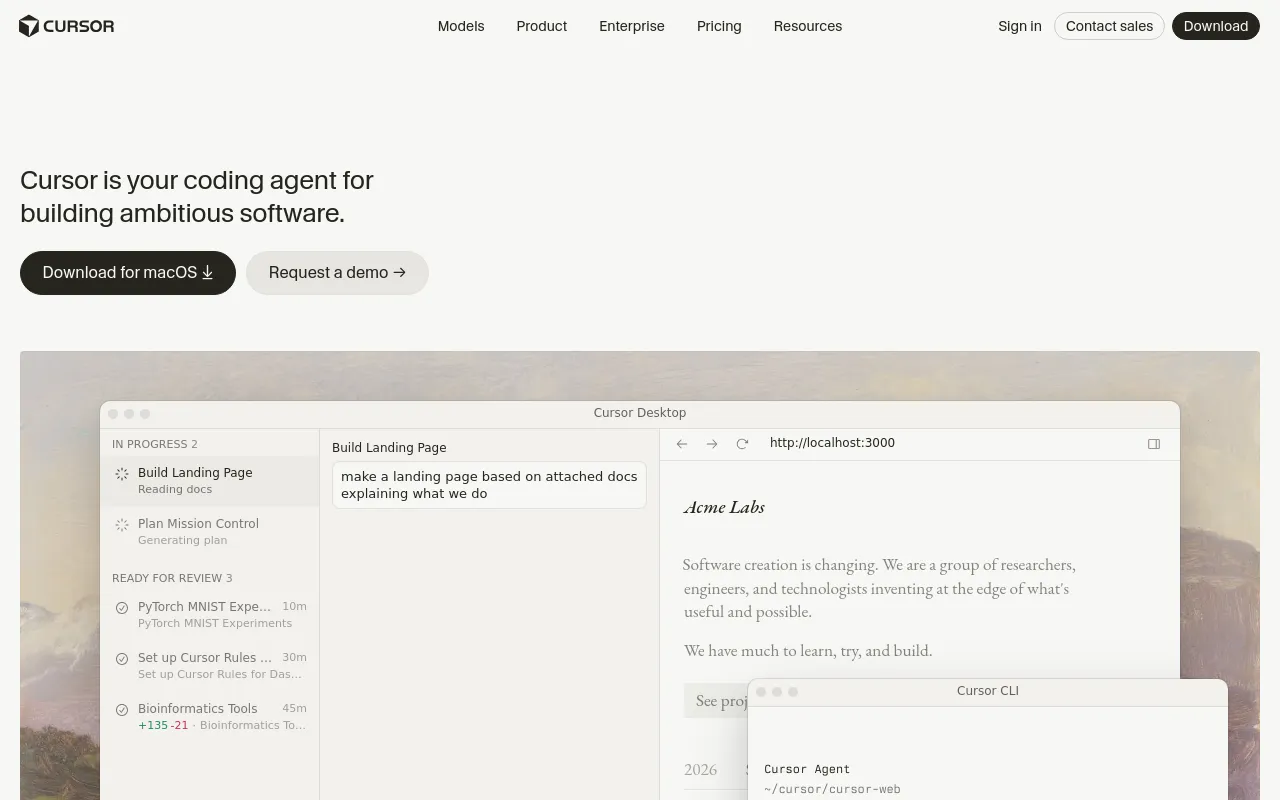
Agents Window

A dedicated, full-screen workspace (replacing the earlier single Composer pane) for running and managing multiple AI agents at once.

Background Agents

Cloud-hosted, sandboxed agents that can read a GitHub issue, open a branch, commit, and draft a pull request on their own; several can run in parallel on separate parts of a codebase using git worktrees.

BugBot

An automated code-review service that comments on pull requests, flagging likely bugs before a human reviewer looks at the diff.

Tab

AI-assisted autocomplete and multi-cursor edits built directly into the editing experience.

Canvases

Lets agent output extend beyond plain text and Markdown, for reviewing and iterating on non-text results directly in the editor.

Multi-Surface Access

Native desktop apps (macOS, Windows, Linux), a JetBrains plugin, iOS and Android apps, and a headless CLI.

How to Use Cursor

  1. Download Cursor for macOS, Windows, or Linux (or use the JetBrains plugin, iOS/Android app, or headless CLI) and sign in — the Hobby plan is free, with no credit card required.
  2. Open a project and use Tab for AI-assisted autocomplete and multi-cursor edits as you type, or open the Agents Window to hand off a task in natural language.
  3. Choose an underlying model for the task — Composer, Anysphere's own fast, agent-tuned model, or another frontier model Cursor supports — and let the agent read the codebase, make multi-file edits, and show you a diff to review.
  4. For tasks that don't need your machine, hand work to a Background Agent: a cloud-hosted, sandboxed agent that can read a GitHub issue, open a branch, commit, and draft a pull request on its own, checkable later from Slack or the mobile app. Cursor supports running several Background Agents in parallel on separate parts of a codebase using git worktrees.
  5. Turn on BugBot to get automated code review comments on pull requests, flagging likely bugs before a human reviewer looks at the diff.
  6. Move to a paid plan (Pro, Pro+, or Ultra) as your monthly credit pool runs low, or Teams/Enterprise for centralized billing, SSO, and admin controls across a group.

Use Cases

  • Day-to-day software development inside a full IDE, with AI-assisted autocomplete (Tab), multi-file agent edits, and repository-wide codebase indexing.
  • Delegating a backlog item to a Background Agent — reading a GitHub issue, opening a branch, committing, and drafting a pull request — so a task can be a draft PR by the time you sit down.
  • Automated pull-request review via BugBot, catching likely bugs before a human reviewer looks at the diff.
  • Running several coding agents in parallel on different parts of the same codebase, using git worktrees, for larger refactors or multi-part features.
  • Reviewing and iterating on non-text agent output (diagrams, UI mockups, and similar) via Canvases, instead of being limited to plain text and Markdown.
  • Team and enterprise rollouts that need centralized billing, SAML/OIDC SSO, SCIM seat management, audit logs, and pooled usage across a group.

Pros & Cons

Pros

  • Ships its own first-party coding model (Composer), tuned specifically for agentic coding rather than general-purpose chat, and advertised as roughly 4x faster than comparable frontier models with most agent turns finishing in under 30 seconds
  • Background Agents run in the cloud rather than tying up your local machine, and can work from a GitHub issue straight through to a drafted pull request, checkable later from Slack or mobile
  • Available across essentially every surface a developer might want — desktop app, JetBrains plugin, iOS/Android, and a headless CLI — plus BugBot for automated PR review, rather than being confined to one editor window
  • Growth and investor backing (a $29.3 billion Series D valuation, then a $60 billion all-stock acquisition by SpaceX that closed in August 2026) suggest strong staying power and continued investment relative to smaller, less-funded coding tools

Cons

  • Now a wholly owned unit of SpaceXAI following the August 2026 acquisition — a major ownership change so recent that its long-term effect on Cursor's roadmap, independence, and pricing isn't yet established
  • Pricing has real jumps for heavy users: Pro is $20/month, but Pro+ is $60/month for 3x the usage credits and Ultra is $200/month for 20x, with credit consumption varying by model and feature so the effective cost per task isn't always predictable up front
  • Composer 2's speed and cost advantages come from being tuned specifically for Cursor's own agentic workflows, so it may not be the best choice for tasks better served by a general frontier model accessed directly — worth comparing case by case
  • As an editor built on a VS Code fork with an increasingly large first-party feature set (Background Agents, BugBot, Canvases, its own model), the product surface has grown quickly, and not every feature is available on every plan tier

Pricing

Hobby

$0

  • No credit card required
  • Limited Agent requests
  • Access to Composer
  • Limited Tab autocomplete

Pro

$20/month

  • Extended Agent usage limits
  • Access to frontier models including Composer
  • MCPs, skills, and hooks
  • Cloud (Background) agents
  • Bugbot on usage-based billing

Pro+

$60/month

  • 3x Pro's usage credits
  • All Pro features

Ultra

$200/month

  • 20x Pro's usage credits
  • Priority access to new features
  • All Pro features

Teams Standard

$40/user/month

  • Centralized team billing and administration
  • Team marketplace for internal rules, skills, and plugins
  • Agentic code reviews with Bugbot
  • Usage analytics
  • SAML/OIDC SSO

Enterprise

Custom (contact sales)

  • Pooled usage
  • Invoice/PO billing
  • SCIM seat management
  • Advanced access controls and audit logs
  • Priority support and account management

Frequently Asked Questions