M

Make This Better

Triage feedback. Ship improvements. Build a better product

No ratings yet|10

From $0/month

On this page

What is Make This Better?

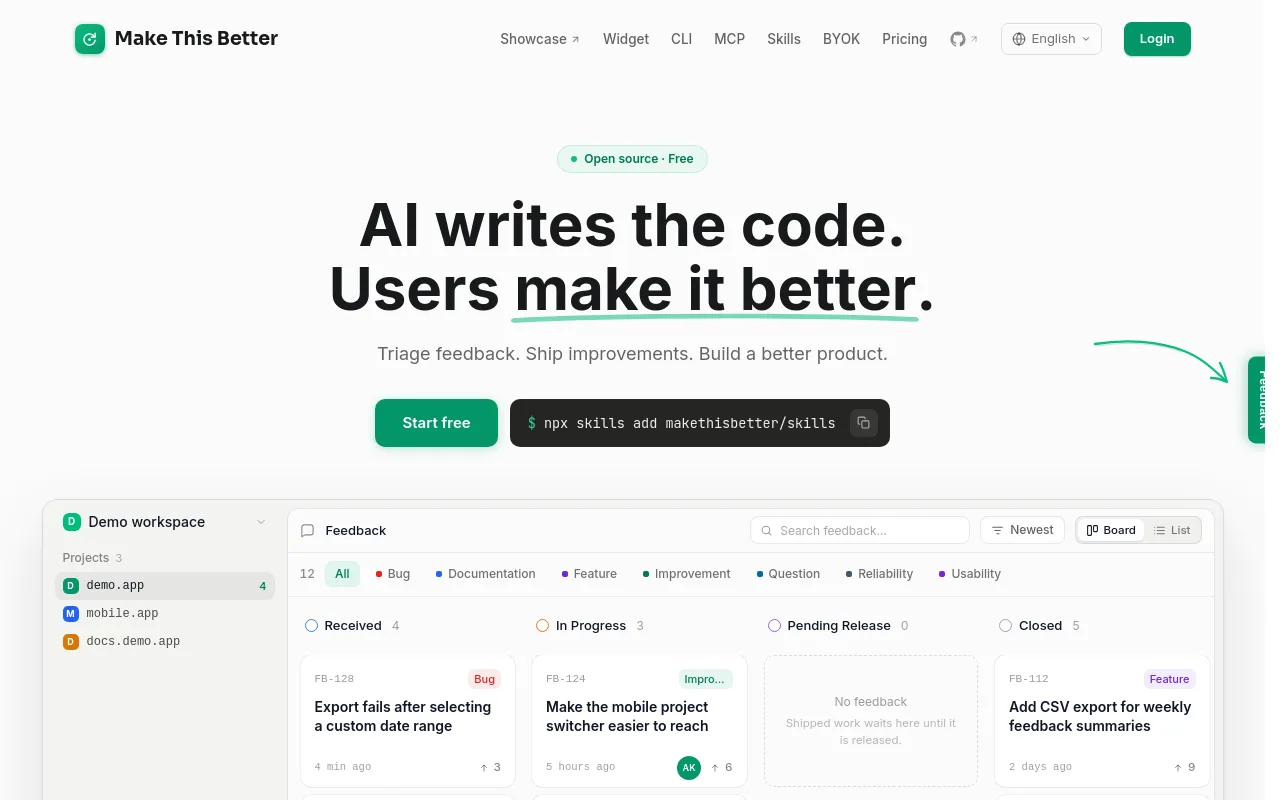
Make This Better is an open-source feedback collection and triage platform built for teams that ship with AI coding agents. A drop-in widget lets end users report a problem by clicking an element, drawing an annotation, and writing a note — while the system automatically captures a screenshot, DOM snapshot, browser info, console errors, and up to 60 seconds of interaction replay (the DOM mutations leading up to the report) in the background. It can also flag frustration signals proactively, such as rage clicks, repeated form failures, or error pages, even before a user files a report.

Once feedback comes in, an AI triage step asks clarifying questions where needed, then extracts the scene (context), the blocker, and the underlying need, turning raw feedback into a structured task. That task connects directly to AI coding agents — Claude Code, Cursor, Windsurf, and Codex — via an MCP server and CLI commands (for example, running /makethisbetter pick to claim a piece of work and inspect its evidence), plus a Skills framework that guides an agent through the fix workflow. A public feedback board shows each item's status moving from received to in progress to shipped, and the person who reported an issue gets a deployment notification when the fix ships.

The core widget is MIT-licensed and open source (available on GitHub, installable via a CDN script tag or npm, with framework support for React/Next.js, Vue/Nuxt, Astro, Ruby on Rails, and plain HTML), while the hosted cloud platform at makethisbetter.dev adds AI triage, a dashboard, GitHub/Linear sync, and email notifications on top of the open-source core.

Core Features

Feedback Widget

Lets users click an element, draw an annotation, and write a note, with automatic screenshot, DOM snapshot, and console log capture in the background.
Interaction Replay

Captures up to 60 seconds of DOM mutations leading up to a report, so the events before a bug can be reviewed.

Frustration Detection

Proactively flags signals like rage clicks, repeated form failures, and error pages, surfacing likely problems before a user reports them.

AI Triage

Asks clarifying questions where needed, then structures a report into the scene (context), the blocker, and the underlying need.

Agent Integration (MCP)

Connects triaged feedback directly to Claude Code, Cursor, Windsurf, and Codex via an MCP server, CLI commands, and a Skills framework that guides the fix workflow.

Public Feedback Board

Shows each report's status moving from received to in progress to shipped, with automatic deployment notifications to the original reporter.

Open-Source Core

The widget is MIT-licensed and available on GitHub, installable via CDN or npm, with support for React/Next.js, Vue/Nuxt, Astro, Ruby on Rails, and plain HTML.

How to Use Make This Better

  1. Install the widget via a CDN script tag or npm (npm install makethisbetter) and initialize it with a project key from makethisbetter.dev.
  2. When a user hits a problem, they click the element involved, draw an annotation, and write a note; the widget auto-captures a screenshot, DOM snapshot, console logs, browser info, and up to 60 seconds of interaction replay, and can flag frustration signals (like rage clicks) automatically.
  3. The AI triage step may ask the user a clarifying question, then structures the report into a scene, a blocker, and the underlying need.
  4. Connect the platform to your AI coding agent — Claude Code, Cursor, Windsurf, or Codex — via the MCP server, and have a developer run a command like /makethisbetter pick to claim a piece of feedback and review its full evidence trail.
  5. Let the agent work the fix using the built-in Skills framework to guide the workflow, then ship the change — GitHub/Linear sync and email notifications keep the loop connected to your existing tools.
  6. Track progress on the public feedback board (received → in progress → shipped), and the original reporter is notified automatically once their fix is deployed.

Use Cases

  • Capturing a bug report with full context — screenshot, DOM state, console errors, and a 60-second interaction replay — instead of a vague one-line description from a user.
  • Catching problems proactively via frustration detection (rage clicks, repeated form failures, error pages) before a user bothers to file a report at all.
  • Feeding triaged, structured feedback directly to an AI coding agent (Claude Code, Cursor, Windsurf, Codex) so a fix can be picked up and shipped with full context, instead of a developer re-investigating from scratch.
  • Giving end users visibility into whether their feedback is being worked on, via a public status board and automatic deployment notifications.
  • Teams that want to self-host or use their own AI provider via BYOK to avoid per-triage AI usage costs, on any plan including Free.
  • Product teams consolidating scattered feedback (bug reports, feature requests, in-app annotations) into one triaged, agent-ready queue instead of spreading it across support tickets, Slack, and email.

Pros & Cons

Pros

  • The core widget is MIT-licensed and open source, and Bring Your Own Key (BYOK) is available on every plan including Free, so a team can avoid per-triage AI costs entirely by using its own API key
  • Automatic evidence capture (screenshot, DOM snapshot, console logs, 60-second interaction replay) means a developer or agent picking up a report doesn't have to ask "can you reproduce this?" — the context is already attached
  • Direct MCP integration with Claude Code, Cursor, Windsurf, and Codex, plus a Skills framework, means feedback can flow straight into an agent's workflow rather than sitting in a separate triage tool a developer has to translate manually
  • End users submitting feedback are always unlimited and free on every plan, so adding the widget to a product doesn't create a per-user cost even as report volume grows

Cons

  • As a young, narrowly-scoped tool, Make This Better has limited public track record and third-party reviews outside its own site and GitHub repo, making it harder to independently verify reliability at scale
  • History retention is capped even on paid plans (1 year on Pro and Team), so teams needing longer-term feedback archives for trend analysis would need to export or sync data elsewhere
  • The workflow is built specifically around AI coding agents (Claude Code, Cursor, Windsurf, Codex) rather than a general-purpose ticketing system, so teams not using one of those agents get less value from the automated 'pick and fix' loop
  • No public information about the company or team behind Make This Better (founders, funding, size) is readily available beyond the GitHub organization, which is common for small open-source-first tools but worth factoring into a vendor-stability assessment

Pricing

Free

$0/month

  • 1 seat
  • Unlimited projects & feedback
  • 30-day history
  • Public board on subdomain
  • $5 AI credits on signup
  • Deploy notifications

Pro

$15.90/month, or $190.80/year (20% savings)

  • 3 seats included (extra seats $5/month or $60/year)
  • 1-year history
  • Private boards
  • Custom domain
  • No Make This Better branding
  • Third-party integrations

Team

$39.90/month, or $478.80/year (20% savings)

  • 10 seats included (extra seats $5/month or $60/year)
  • Everything in Pro
  • Roles and permissions
  • Per-project access controls

Frequently Asked Questions